As AI agents move from experimental tools into production environments in 2026, one of the biggest engineering challenges is no longer building the agent itself—it is connecting that agent safely to the systems a business already depends on.
For many organizations, those systems include CRMs such as Salesforce or HubSpot, custom web applications, ERP platforms, databases, helpdesk software, payment systems, and legacy backends.
This creates an important technical question: How do you integrate AI agents with existing CRMs and web systems without disrupting active operations, exposing sensitive data, or creating unreliable automation?
In most cases, rebuilding an existing software platform from scratch is unnecessary. A better approach is to introduce an AI agent through controlled APIs, middleware, event-driven services, and carefully scoped permissions.
This guide explains the main AI agent integration architectures used in 2026, how to connect agents to production CRMs and web platforms, how to handle legacy systems, and which security and reliability controls should be implemented before an agent is allowed to execute real business actions.
Table of Contents
3 Core Architectures for AI Agent Integration
AI agents can be integrated into existing business systems through several architectural patterns. The right approach depends on system maturity, transaction volume, security requirements, and how much autonomy the agent needs.
| Integration Architecture | Technical Pattern | Best For | Typical Complexity |
| API & Webhook Integration | REST APIs, GraphQL, Webhooks | CRMs, SaaS platforms, modern web applications | Moderate |
| Middleware / Tool Gateway | Custom middleware, service adapters, MCP where appropriate | Multi-system orchestration and controlled tool access | Medium–High |
| Event-Driven Service Layer | Message queues, Kafka, CDC, service APIs | ERP systems, legacy environments and high-volume workflows | Enterprise |
The Model Context Protocol (MCP) can be useful when an AI application needs a standardized way to discover and call tools or access external resources. However, MCP should not automatically replace existing API gateways, middleware, authentication systems, or service architecture. In production environments, it is typically one component within a broader integration layer.
Key Steps to Connect AI Agents to CRMs & Business Systems
System & Data Mapping
Before writing code, map out data flows across your active platforms. Identify where customer data resides (CRM), where transactions occur (e-commerce/ERP), and where communication happens (helpdesk/email). Clear schema mapping prevents data duplication and synchronization errors.
The mapping process should also identify which systems represent the source of truth for each data type. An AI agent should not create competing copies of critical customer, financial, or operational data unless a synchronization strategy has been explicitly designed.
Authentication, Authorization & Least-Privilege Access
AI agents should never receive unrestricted access to production systems.
Each integration should use the narrowest possible permission scope required for the workflow. Depending on the platform, this may include OAuth-based authorization, such as Salesforce OAuth & External Client Apps or HubSpot OAuth Authentication, scoped API credentials, role-based access control (RBAC), short-lived tokens, and service-specific permission policies.
For example, an AI agent responsible for lead qualification may require permission to read contact information and create CRM notes, but it should not automatically receive permission to delete accounts, modify billing records, or export the entire customer database.
Production implementations should follow the principle of least privilege and separate read permissions, write permissions, and high-risk actions wherever possible. For MCP-based integrations, authorization should also follow the current MCP security model rather than relying on unrestricted server access.
Event-Driven Triggers Instead of Constant Polling
Production AI agents should usually respond to business events rather than continuously polling databases.
Webhooks, message queues, event buses, or change-data-capture pipelines can notify an agent when something meaningful happens.
For example:
Website form submitted → webhook triggered → middleware validates the event → AI agent analyzes the lead → CRM record is created or updated → follow-up workflow begins
This approach reduces unnecessary API requests, improves scalability, and creates a clearer audit trail for automated actions.
Human-in-the-Loop Approval for High-Risk Actions
Not every AI-generated decision should be executed automatically.
For higher-risk actions—such as issuing refunds, changing contract terms, modifying financial records, deleting customer data, or sending sensitive external communications—the agent should prepare the action and route it through an approval checkpoint.
A production approval workflow should record:
The requested action
The data used by the agent
The agent’s recommendation
The responsible approver
The final decision
The resulting system action
This creates accountability while still allowing AI agents to automate the preparation and coordination of complex workflows.
Example: AI Agent + Website + CRM Integration Flow
A typical production AI agent workflow might look like this:
Website → Webhook → Validation Layer → AI Agent → CRM API → Human Approval → Business Action → Audit Log
Consider a consulting company receiving a new project request through its website:
A visitor submits the consultation form.
The website sends a webhook event to the integration middleware.
The middleware validates the request, checks required fields, and normalizes the submitted data.
The AI agent analyzes the request, identifies the requested service, extracts key requirements, and assigns a qualification score.
The CRM API is queried to determine whether the prospect already exists.
The agent creates or updates the CRM record and prepares a recommended next action.
If the action is considered sensitive or high-value, it is routed to a staff member for approval.
Once approved, the appropriate follow-up workflow is triggered.
Every important action is recorded in an audit log for monitoring and troubleshooting.
Separating reasoning, permissions, execution, and approval is one of the most important design principles when AI agents interact with production business systems.
Integrating AI Agents with Legacy Backends
Many organizations still operate critical business systems that were built before modern REST APIs, cloud-native authentication, or event-driven infrastructure became standard.
AI integration does not necessarily require replacing these platforms. Instead, businesses can introduce controlled service layers between the AI agent and the legacy system.
Custom API Wrappers
A lightweight middleware service can expose selected legacy functions through controlled APIs. Instead of allowing the AI agent to access the underlying database directly, the middleware validates requests, applies business rules, controls permissions, and returns only the required data.
Read Replicas, Retrieval Layers & Vector Indexing
Transactional business data should generally remain inside governed databases or existing service layers. Read replicas, change-data-capture pipelines, or dedicated retrieval services can reduce load on production systems while allowing AI applications to access synchronized information.
Vector indexes should be introduced selectively for semantic search across documents, knowledge bases, support content, policies, or other unstructured information—not as a replacement for transactional databases.
Reliability, Idempotency & Failure Recovery
AI agent integrations must assume that APIs, networks, third-party services, and downstream systems will occasionally fail.
Production architectures should therefore include:
Timeout handling
Controlled retry policies
Idempotency keys
Duplicate-action prevention
Audit logs
Dead-letter queues
Exception monitoring
Compensating workflows
For example, if a CRM API becomes temporarily unavailable, the system should queue the requested update and retry safely rather than repeatedly creating duplicate customer records. Not every external action can be rolled back, so production systems should distinguish between reversible operations and irreversible actions before execution.
AI Agent Integration Security Checklist
Before connecting an AI agent to a production CRM or web platform, engineering teams should verify the following:
[ ] Use least-privilege permissions
[ ] Separate read, write, and administrative access
[ ] Store credentials in a secure secrets manager
[ ] Use short-lived credentials where supported
[ ] Validate webhook signatures
[ ] Sanitize and validate external inputs
[ ] Log important agent actions
[ ] Require human approval for high-risk operations
[ ] Prevent duplicate transactions through idempotency controls
[ ] Define timeout and retry policies
[ ] Monitor API errors and failed tool calls
[ ] Maintain a clear process for revoking agent access
Security should be part of the integration architecture from the beginning—not an additional layer added after deployment.
When You Should NOT Connect an AI Agent Directly to a Business System
Direct AI integration is not always the right architecture. Avoid giving an AI agent direct execution access when:
The underlying workflow is poorly defined
APIs do not provide sufficient permission controls
Sensitive actions cannot be reviewed or reversed
Data quality is unreliable
System failures could create financial or compliance risk
The integration cannot be properly monitored
In these situations, a recommendation-only agent or human-assisted workflow may be safer than full automation.
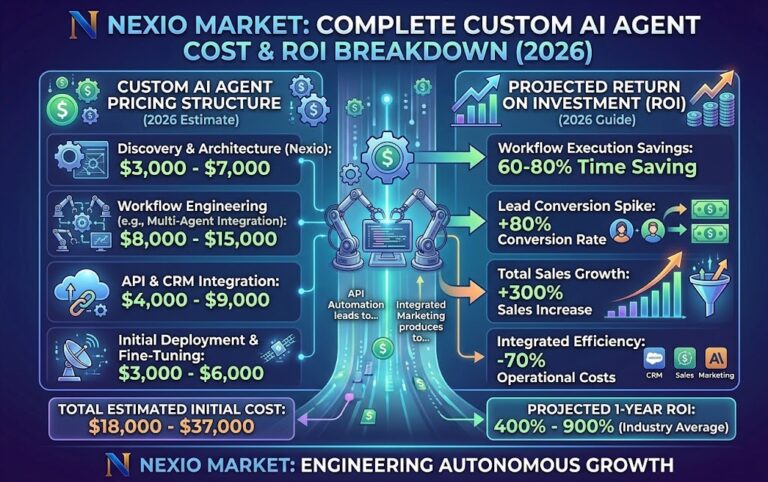
How Integration Complexity Affects AI Agent Cost
Integration complexity is one of the largest variables in the total cost of an AI agent project.
Connecting an agent to one modern SaaS platform through a documented API is fundamentally different from integrating the same agent with multiple CRMs, ERP systems, proprietary databases, legacy applications, and approval workflows.
The number of systems involved affects engineering time, authentication architecture, data transformation, testing requirements, infrastructure, monitoring, security, and long-term maintenance.
For a detailed pricing breakdown, see our guide:
How Much Does a Custom AI Agent Cost in 2026?
For additional technical context, explore our comparative guide on AI Agent vs AI Assistant in 2026 or review our criteria for Choosing an AI & Web Engineering Partner.
Frequently Asked Questions
Can AI agents integrate with Salesforce or HubSpot?
Yes. Modern CRMs such as Salesforce and HubSpot provide APIs, webhooks, authentication mechanisms, and integration capabilities that can be used to connect AI-driven workflows. The exact implementation depends on the required permissions, data model, and actions the AI agent needs to perform.
Can an AI agent work with a legacy CRM?
Yes, but legacy systems often require an additional middleware or API wrapper. The AI agent should generally interact with this controlled service layer rather than receiving unrestricted access to the legacy database.
Should AI agents connect directly to production databases?
Usually not. Production systems should expose controlled APIs or service layers wherever possible. Direct database access increases security, reliability, and governance risks and should only be considered in carefully controlled environments.
What is MCP in AI agent integration?
Model Context Protocol (MCP) is a standardized protocol that can allow AI applications to discover and interact with external tools and resources. In enterprise systems, MCP may complement existing APIs and middleware but does not automatically replace security gateways, business logic, or integration architecture.
How much does AI agent CRM integration cost?
Integration cost depends heavily on the number of systems involved, API availability, data complexity, security requirements, workflow autonomy, testing, and monitoring requirements. Integrating a single modern CRM may be relatively straightforward, while multi-system enterprise deployments can require significantly more engineering work.
How long does AI agent integration take?
A focused integration with a modern platform may take several weeks, while enterprise environments involving multiple systems, legacy infrastructure, custom security requirements, and approval workflows may require substantially longer implementation and testing cycles.
Integrate AI Agents into Your Existing Technology Stack
A successful AI agent integration is not simply an API connection. It requires a controlled architecture that connects AI reasoning with real business systems while maintaining security, reliability, permissions, monitoring, and human oversight.
At Nexio Market, we design and engineer custom AI integrations for web applications, CRMs, business platforms, and existing software environments. Whether you are connecting an AI agent to a modern SaaS stack or introducing intelligent automation into a legacy system, the architecture should be designed around your existing workflow—not force your business to rebuild everything from scratch.
Explore our technical capabilities on the Services page.
Review selected client projects in our Portfolio.
Learn more about our engineering approach on our About Us page.
Connect with us on our official LinkedIn Page.
Planning an AI agent integration? Contact Nexio Market for a technical assessment of your existing systems, integration requirements, security model, and automation opportunities.